DarkMoon research series·C. OpenCode & TUI·Article 16 of 23·All 23 articles
Introduction
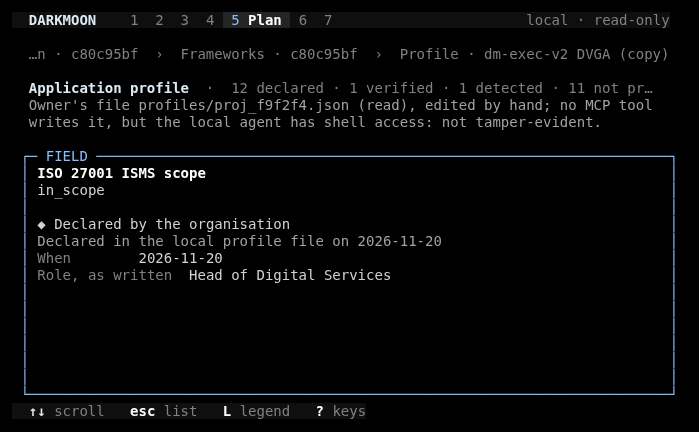
« Premium » is not a measurable property, and we will not pretend it is. In this article it means something narrower: the product owner's bar for the DarkMoon Terminal Explorer was that it should look and behave like a finished tool, comparable to terminal programs operators already respect, and match the DarkMoon web dashboard's vocabulary and palette. This article describes the design decisions taken to approach that bar with OpenTUI, the terminal UI library used by the OpenCode console, and where the result still falls short.
Everything here is documented in darkmoon-visualization-research/tui and visible in the open-source code at conf/plugins/darkmoon-explorer.
Problem
A terminal gives a designer a fixed grid of cells, a limited set of glyphs, colours that depend on the terminal emulator, and no images. The Explorer had to show dense security data (findings tables, an executive summary, a treatment plan, attack paths, framework mappings) at sizes from a standard 80×24 window to a wide 160×45 one, in dark and light themes, without ever calling a model.
Methodology
References used as ideas, not code
| Reference | Idea taken | Not taken, and why |
|---|---|---|
| Lazygit | titled panes, accent on the focused pane, list + inspector, tab between panes | a box around every pane (first replaced by surface steps, later partly reinstated) |
| K9s | dense tables, a header row, single-key filters, keys in the footer | one colour per column (kept to a four-step ink ramp) |
| btop | horizontal bars, sparkline, a figure with a small visual under it | braille graphs and per-core meters (no time series beyond discovery times) |
| Posting | section bar, quiet panels, document-like reading pane | collapsible sidebar tree (a contents rail instead) |
No code was reused: the plugin has no package.json, and its only imports are @opencode-ai/plugin/tui, @opentui/*, solid-js and node:child_process (VERIFIED, code).
Layout by column count
The plugin picks one of four layouts from the terminal width: wide ≥ 150 columns, split ≥ 100, compact ≥ 80, single below that (VERIFIED, index.tsx). On 20 November 2026 the seven tabs (Work, Proj, Camp, Find, Plan, Paths, Docs) gained four-letter labels between 80 and 99 columns, and the legend became scrollable, so that an 80-column window shows every tab (VERIFIED, Community PR #62).

Colour: a ramp, not a rainbow
The palette lives in palette() in core.ts. In dark mode the surfaces step through #000000 / #0f0f0f / #1a1a1a / #242424 and text through four inks #ffffff / #d1d1d6 / #a1a1a6 / #808085; the brand blues (Alice, Jordy, Uranian) are the only accents, and severity colours appear on data only (VERIFIED, code). Dark or light follows the host's api.theme.mode(). Exact colours need a truecolor terminal.
Borders: removed, then reinstated
The second version of the Explorer followed a rule from its release notes: no border between panes, no box frames, hierarchy by surface steps only. The visual-polish iteration reversed it. Commit edecb5a9 introduced single-line pane borders with inline titles (┌─┐│└┘, title in the top line, focused pane in the Jordy accent, others in a neutral grey), and ddfd523c added ASCII borders through OpenTUI's customBorderChars. Wide emoji were replaced by a one-cell mark so that borders align (VERIFIED). The earlier rule is recorded as SUPERSEDED (UXDR-20).
Keyboard model
Navigation is keyboard-only and borrows familiar conventions (VERIFIED, index.tsx):
j/kor arrows to move,pgup/pgdnorctrl+u/dto page;enter,→orlto open;esc,←,horbackspaceto go back;/to search,n/Nfor matches;f/s/tto filter by severity, proof or target;oto sort;cto clear;1–7for tabs,tabto switch pane,?for the key list;qreturns to the console. It is the only exit:escat the root shows « Press q to return to the console. » after an incident in which scripted keys reached the agent chat (one model answer, $0.09; VERIFIED).
Real results
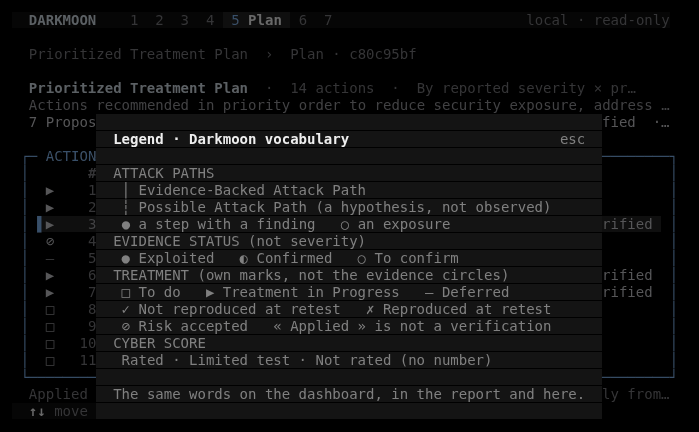
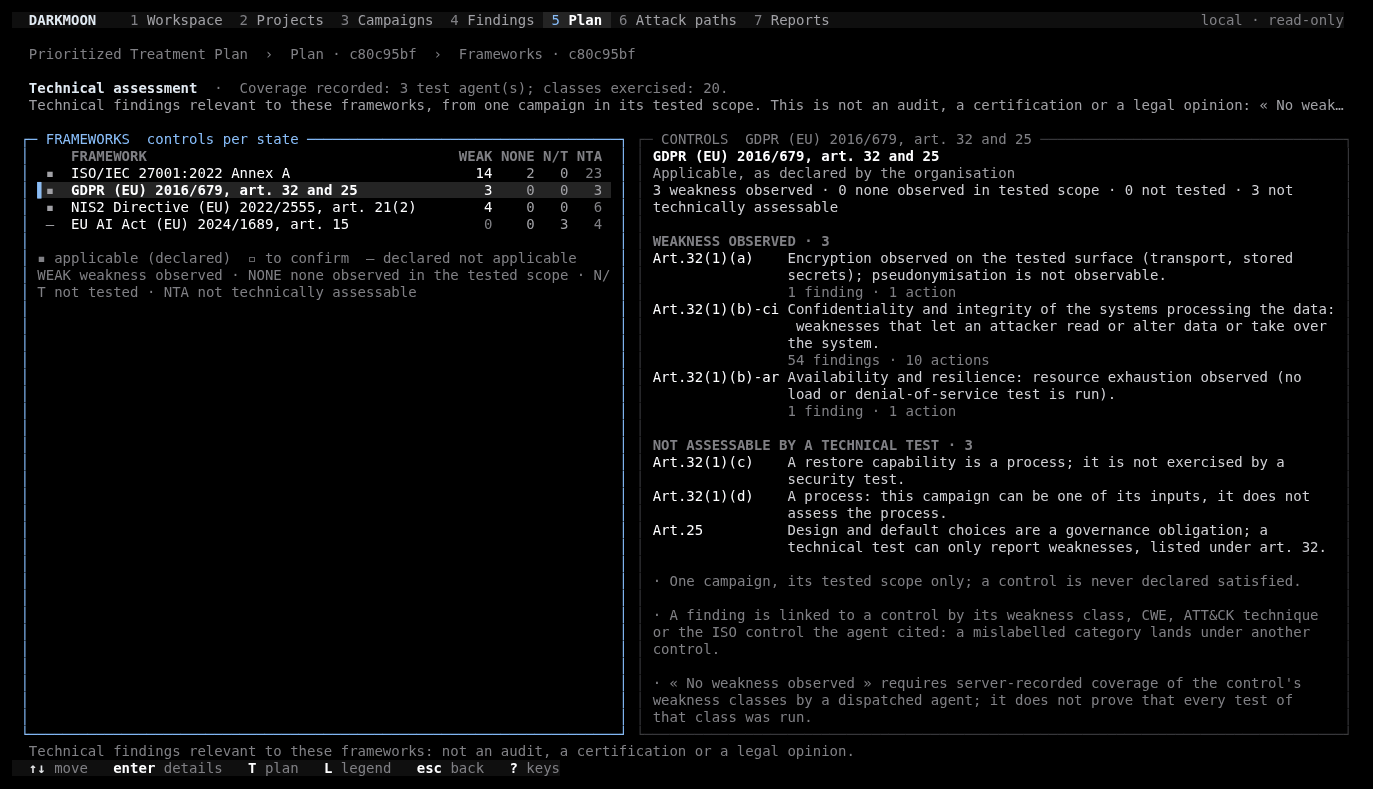
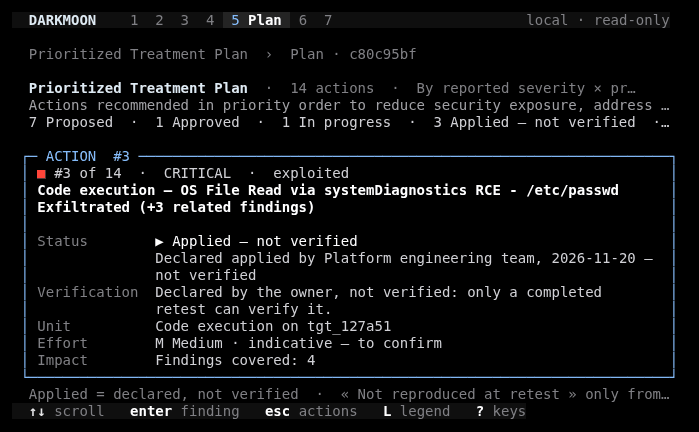
| Iteration | Result | Status |
|---|---|---|
| V1 prototype (Pro, 18 Nov) | 16 screens on real DVGA data; 15 bun tests | VERIFIED |
| V2 workspace + Community source | 34 captures; bun 23, Python 7 | VERIFIED |
| Visual upgrade | bun 28, Python 8; three before/after iterations | VERIFIED |
| Border polish | 8 ANSI + 8 PNG captures | VERIFIED |
| Community port (PR #59, 19 Nov) | 18 PNG + 18 ANSI captures | VERIFIED |
| Executive views | bun 40 → 43 (224 expects); Community Python 29 → 32; 36 PNG per edition | VERIFIED |
| 80-column tabs + scrollable legend (20 Nov) | bun 48/48 | VERIFIED |
Runtime cost of the plugin: +44 MB RSS on a ~700 MB baseline, image size unchanged at 353 MB (VERIFIED, report).
Limits
- Our own verdict: the visual-polish report states that the Explorer is « not yet at Lazygit / btop level » on logo rendering and Markdown tables (VERIFIED, report).
- No images: the brand mark is the text
DARKMOON. - Markdown tables and block quotes are drawn by the host and can only be recoloured from a plugin.
- ASCII mode was not captured in the latest iteration, so its appearance at that stage is not documented by an image.
- Severity colours differ from the web dashboard's tokens (see From Angular to TUI).
- No render-time measurement and no user study (not measured). « Premium » here is an owner judgement on captures, not a measured outcome.
Figures
- Figure 1 (Mermaid): layout breakpoints.
- Captures: ANSI dumps of the real TUI rendered to PNG, synthetic demo data,
screenshots/current/of the research repository (namingedition-tui-feature-COLSxROWS-version.png).
Scientific and technical sources (verified)
- OpenTUI. https://github.com/anomalyco/opentui
- Lazygit https://github.com/jesseduffield/lazygit · K9s https://github.com/derailed/k9s · btop https://github.com/aristocratos/btop · Posting https://github.com/darrenburns/posting
- Unicode Consortium. Box Drawing code chart (U+2500–U+257F). https://www.unicode.org/charts/PDF/U2500.pdf
- W3C. Understanding SC 1.4.1: Use of Color (WCAG 2.2). https://www.w3.org/WAI/WCAG22/Understanding/use-of-color.html
All fetched on 2026-11-20. WCAG is written for web content; we cite it for the principle that state should not rely on colour alone, not as a terminal conformance claim.
Research, source code & reproducibility
- Main research repository: ASCIT31/darkmoon-visualization-research: tui/rendering, tui/keyboard-navigation, tui/iterations, research/terminal-interfaces.
- Source code: ASCIT31/Dark-Moon →
conf/plugins/darkmoon-explorer: palette and glyphs incore.ts, layouts and key bindings inindex.tsx. - Documentation: https://docs.dark-moon.org
- References: references/README.md (terminal interfaces).
- Reproducible experiments: open
/explorein DarkMoon Community and resize the terminal across 80, 100 and 150 columns to see the layout switch; setDARKMOON_ASCII=1to force the ASCII fallback.
Related reading: Bringing DarkMoon to the Terminal: Building an OpenCode Explorer · Visualizing Attack Paths in ASCII and Unicode · From Angular to TUI: Designing Two Interfaces Around the Same Security Data
Screenshots of the Explorer misrendering in your terminal emulator are useful to us; please attach them to an issue on ASCIT31/Dark-Moon.
See the proof, not just the write-up: the Pro remediation benchmark (fixes retested against the exploit) · how Darkmoon compares to other AI pentest tools.
← All articles