Autonomous penetration testing changes the shape of the output. A human tester writes a report of a dozen findings; a multi-agent system can return dozens of qualified findings per target, each attached to an asset, a technique and a piece of evidence. The bottleneck moves from finding to understanding. Spatial and immersive views, from 3D graphs on a desktop to a WebXR headset session in the browser, are often proposed as an answer. This article asks what the research actually supports, what it does not, and where our own implementation stands against that evidence.
It is the scientific companion to how we redesigned our own infrastructure graph, which tells the product story. Here we do not repeat that narrative. We review the literature on attack graphs, graph visualization and immersive analytics, describe the relevant web standards, audit the code we ship, and end with hypotheses and an experimental protocol that we have not run yet.
The question, and how to read this study
To what extent could an immersive view improve six things: understanding of the attack surface, navigation in large graphs, identification of exploitation paths, prioritization of vulnerabilities, communication between pentesters, SOC analysts and decision makers, and comprehension of what an autonomous system did? We use three labels throughout and keep them apart.
- Demonstrated. Reported by a peer-reviewed study or a standard that we read, with the conditions under which it holds.
- Implemented. Present in Darkmoon code, with the repository (and the commit, when the repository is public). Implemented does not mean evaluated.
- Hypothesis. Plausible, not tested by us or, as far as we found, by anyone in this exact setting.
Short answer
What an attack graph is, and how it differs from an attack tree
Graphical security models are, in the words of a recent survey, a well-known and user-friendly way to represent the security of a system [17]. Two families dominate. An attack tree decomposes one attacker goal into sub-goals joined by AND/OR refinements: it is goal-centred and hierarchical. An attack graph represents how an attacker can move between states or privileges in a concrete system: nodes are conditions or exploits, edges are the enabling relations, and a path is a multi-step compromise. Sheyner et al. observed in 2002 that attack graphs were then produced by hand by red teams, a process they describe as tedious and error-prone, and generated them automatically by symbolic model checking [13]. MulVAL then encoded vulnerabilities, configurations and privilege rules in Datalog and reported analysis in seconds on networks of thousands of machines [14]. Both surveys we read agree that manual construction does not scale and that automatic generation is an active field [17].
Visual syntax is not settled. Lallie, Debattista and Bal analysed more than 180 attack graphs and attack trees and found no standardized visual syntax: over seventy attack graph configurations and about twenty attack tree configurations, each drawing preconditions and exploits differently, with little empirical or comparative evaluation of these choices [16]. Any team that draws an attack path, including ours, is therefore making design decisions the field has not validated.
| Attack tree | Attack graph (model) | Evidence graph (Darkmoon) | |
|---|---|---|---|
| Unit | Goal and sub-goals | Condition or exploit | Asset with qualified findings |
| Edge means | Refinement (AND/OR) | Enables / precondition | Contains / runs on (discovered structure) |
| Built from | Analyst knowledge | Configuration + vulnerability data | What agents observed and proved |
| Can contain the unproven | Yes | Yes, by design (what could happen) | Yes, but marked unconfirmed |
| Main risk | Incomplete goals | State explosion, hard to read | Only as complete as the test |
Where the edges come from: reachability models versus evidence
Classic attack graphs answer “what could an attacker do, given this configuration”. They reason over preconditions, so a path can exist even if nobody ever executed it. That is their strength (coverage) and their weakness for decision makers (a path is a hypothesis about the network). An autonomous pentest produces the opposite kind of object: a set of findings that were actually tried against the target. In the open-source Darkmoon engine, the agent playbook requires every finding to be given a status by demonstrated impact, not by observation: EXPLOITED (impact executed end to end), CONFIRMED (exact request, raw response and extracted data or execution trace) or UNCONFIRMED (a real lead whose impact is not demonstrated, kept at low severity with CVSS at most 3.9). The rule is in the agent playbook conf/agents/pentest.md of ASCIT31/Dark-Moon (commit 1b6af79). We explain why we prefer evidence from exploitation rather than a score in a separate article, and how the agents produce the findings the graph displays in another.
Both objects need MITRE ATT&CK to speak a common language, and ATT&CK imposes a caution that visualizations often ignore. The matrix defines tactics as the adversary’s tactical goal, “the reason for performing an action”; at the time of writing the Enterprise matrix (v20) lists fifteen tactics, from Reconnaissance to Impact, including the renamed Stealth and Defense Impairment tactics [11]. Techniques are not bound to one tactic: Valid Accounts (T1078) belongs to Stealth, Persistence, Privilege Escalation and Initial Access at once [12]. Any drawing that lays techniques on a single left-to-right kill chain is therefore a modelling choice, useful for narration but not a property of the data.
Attack graph visualization in 2D
The readability problem is old. Noel and Jajodia noted in 2005 that the graph-drawing approaches of the time made the “often large and complex graphs” hard to understand and proposed clustered adjacency matrices instead [15]. Their intuition matches a controlled study on generic graphs: Ghoniem, Fekete and Castagliola found that above about twenty vertices, matrix representations beat node-link diagrams on most of seven generic tasks, with one consistent exception: path finding, which favoured node-link diagrams throughout [18]. That exception matters here, because following an attack path is a path-finding task.
Classic graphical perception research gives a second constraint. Cleveland and McGill ordered elementary perceptual tasks by how accurately people perform them and recommended encoding quantities with tasks as high in that ordering as possible [19]. A layout in which radius encodes exposure, as in our orbital graph, uses position to carry an ordinal variable; perspective and rotation in 3D distort distances on screen, which is one reason to keep a head-on default view.
Immersive analytics: what 3D and VR add, and what they cost
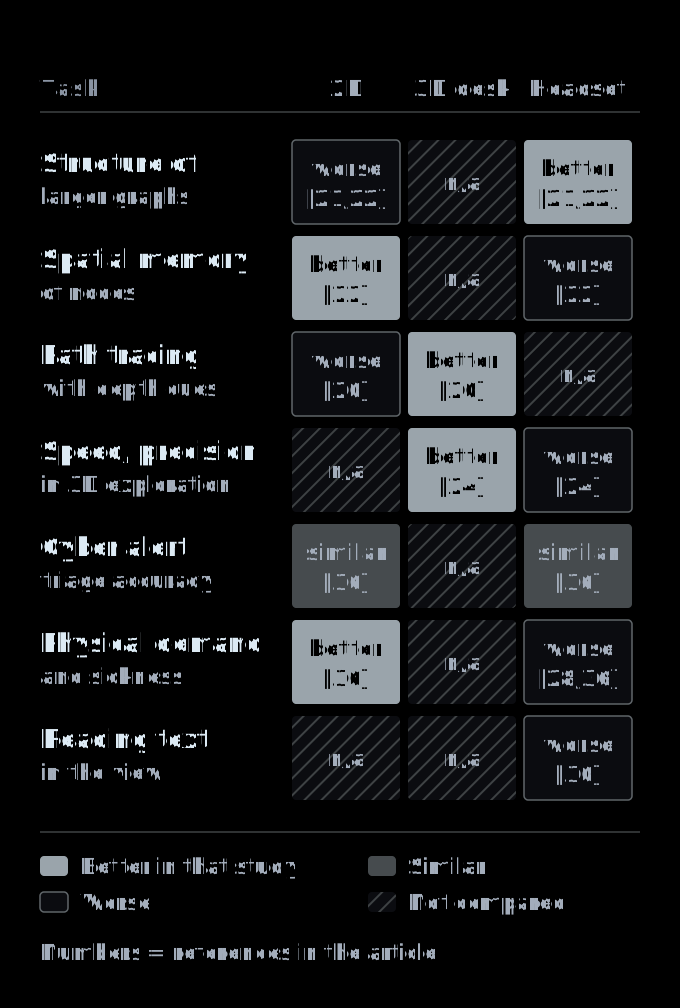
Immersive analytics, the use of VR, AR and large displays for data analysis, is now a structured field: a group of 24 experts set out 17 grand challenges for it at CHI 2021 [26], and a 2025 survey of visual network analysis in immersive environments covered 138 publications, 87 applications and 59 user evaluations [25]. The results relevant to attack graphs are below, and Figure 1 summarizes them by task.
Evidence for
- Depth cues help path tracing. Ware and Franck found that head-coupled stereo roughly tripled the size of a graph that people could understand, with stereo alone giving a factor of 1.6 and head coupling 2.2; structured motion helped more than stereo [20].
- Immersion can help on larger graphs. Kwon et al. report that participants answered significantly faster with fewer interactions using their immersive techniques, especially for harder tasks; overall correctness did not differ, but answers were more often correct for larger graphs [21]. Kotlarek et al. found structure interpreted more accurately in an immersive environment, particularly for larger networks [22].
- Headsets are viable for shared analysis. In a collaborative connectivity task, pairs using HMDs were faster than in a CAVE2, with no difference in accuracy or communication [23].
Evidence against, or mixed
- 2D wins on spatial memory. The same Kotlarek study found 2D better for tasks that need spatial memory [22], which is what an analyst uses to come back to “that asset”.
- Desktop is often fastest and most precise. Comparing a HoloLens, a tablet and a desktop for 3D exploration with 15 participants, Bach et al. found each environment better for some tasks but the desktop fastest and most precise in almost all cases [24].
- Results depend on the task and the graphs are small. The 2025 survey reports mixed or negative findings in several studies, tested networks between 5 and 7,885 nodes with a median of 120, rare studies of data complexity and a single one on scalability [25].
- Presence is not learning. In a 2×2 study with 52 students, adding immersive VR to a science simulation raised presence (d = 1.30) but lowered learning (d = 0.80) and raised EEG-measured cognitive load (d = 0.59) [31]. The domain differs from security, but the warning about novelty and overload transfers.
Human costs: sickness, comfort, text
A meta-analysis of 55 studies (3,016 participants) found that content significantly influences VR sickness; controller-driven locomotion produced the highest total sickness scores among locomotion modes and physical walking the lowest [28]. A review of causes notes that better visual quality alone does not reliably reduce sickness [29]. Text is a structural problem: Novotny and Laidlaw measured reading speed on two HMDs and a CAVE and found that even high-fidelity VR displays have a larger critical print size than comparable physical text [30]. A security visualization is mostly labels, identifiers and evidence, so this cost is central, not peripheral.
Immersive visualization in cyber defense and the SOC
Situational awareness gives the vocabulary. Endsley’s model distinguishes perception, comprehension and projection, and names attention and working memory as the critical limits on acquiring and interpreting information [32]. Franke and Brynielsson’s systematic review of cyber situational awareness covered 102 articles and framed it as the cyber subset of general situational awareness [33].
Immersive work in this domain exists but is young. Kabil et al. designed a 3D collaborative environment for cyber analysis after visiting French SOCs [34]; in a later usability study, 30 participants with no cybersecurity background performed a simplified alert analysis based on the WannaCry scenario, with SUS scores above 70 in three variants and a preference for the coupled graph-plus-office environment [35]. That study compared immersive variants with each other, not with a 2D tool. Delcombel, Duval and Pahl did run a VR versus 2D comparison for alert triage on periodic OT data with 24 volunteers: classification success was similar, response time did not differ significantly on the first set of alerts and was shorter in VR on the second, SUS was comparable (77 versus 74), the VR version was rated more physically demanding and produced higher flow, and the three experts interviewed noted that VR isolates them from their usual tools [36]. Kullman and Engel argue that for a visualization to help a cybersecurity expert, interaction must be free of additional mental tasks and the layout must map to the expert’s own understanding [37].
A 2024 survey of immersive cyber situational awareness systems selected 43 studies and found most evaluated through user studies with relatively few participants (6 to 208 in the reported table), and a significant lack of techniques for the projection level of situational awareness [38]. Projection, anticipating what an attacker does next, is precisely what an attack path view claims to support.
Visualizing what an AI agent did
Two further strands concern autonomous systems. PentestGPT’s authors found that LLMs handle sub-tasks of a penetration test well but struggle to keep an integrated understanding of the whole scenario [39]: the same fragmentation reaches the human reading the output. AgentLens builds a hierarchical, causal, temporal visualization from raw agent execution logs [40], a reminder that explaining an agent is about provenance and time, not only topology. And human factors research on automation warns of misuse (over-reliance) and disuse (ignoring a system after false alarms), with the saliency of automation state indicators among the factors [41]. For a visualization of autonomous pentest output, the honest state indicator is the evidence status of each finding: a view that hides it invites over-trust.
The WebXR Device API as a delivery channel
WebXR is the W3C API for rendering to VR and AR devices from a web page. At the time of reading, the core specification is a Candidate Recommendation Draft dated 9 June 2026 [1]. Several of its rules shape any security tool built on it:
- Secure context only.
navigator.xrandXRSessionare restricted to secure contexts [1], so a self-hosted dashboard must be served over HTTPS (or localhost) to offer VR. - Detection without prompts.
isSessionSupported()must not trigger device-selection UI [1], which lets a page probe for VR silently and keep the 2D view as the default. - Modes and permissions.
inline,immersive-vr, andimmersive-ar(defined by the AR module); immersive modes require thexr-spatial-trackingpermissions policy, and floor-level reference spaces always require user consent [1]. - Frame budget. In the visible state,
XRSession.requestAnimationFramecallbacks run at the device’s native refresh rate [1], so the scene must be drawn for every view (typically one per eye) within that budget. - Input. Interaction arrives as
selectandsqueezeevents on input sources [1]. On Apple Vision Pro, WebKit added atransient-pointermode that exists only for the duration of a pinch; in March 2024 it was available behind a flag, for testing purposes [9].
Text, the weak point identified above, is what the modules address. The WebXR Layers module (a Working Draft of August 2026) defines quad and cylinder layers composited by the system; it notes that the classic WebGL path resamples content at least twice and offers a “text-optimized” quality hint [3]. The DOM Overlays module (Working Draft, September 2024) lets HTML be shown during an immersive session, including as a floating rectangle on a headset [4]; we have not tested it. MDN lists WebXR as experimental and not Baseline [2]. On caniuse at the time of writing, desktop Chrome and Edge have partial support since version 79, Firefox ships it disabled by default and Safari on iOS has none [7].
Rendering sits on WebGL 2, derived from OpenGL ES 3.0 [6], or on WebGPU, a Candidate Recommendation Draft (September 2026) whose adapters can be requested for WebXR compatibility [5]. The Layers module text we read defines only a WebGL binding [3], and caniuse reports WebGPU enabled by default in Chrome and Edge from version 113, partial in Safari from 26 and disabled by default in Firefox [8]. For a tool that must also run on modest hardware, WebGL 2 remains the safer base today; our sister article covers rendering the scene on integrated GPUs.
Case study: the Darkmoon orbital graph
Scope and boundary
Pipeline
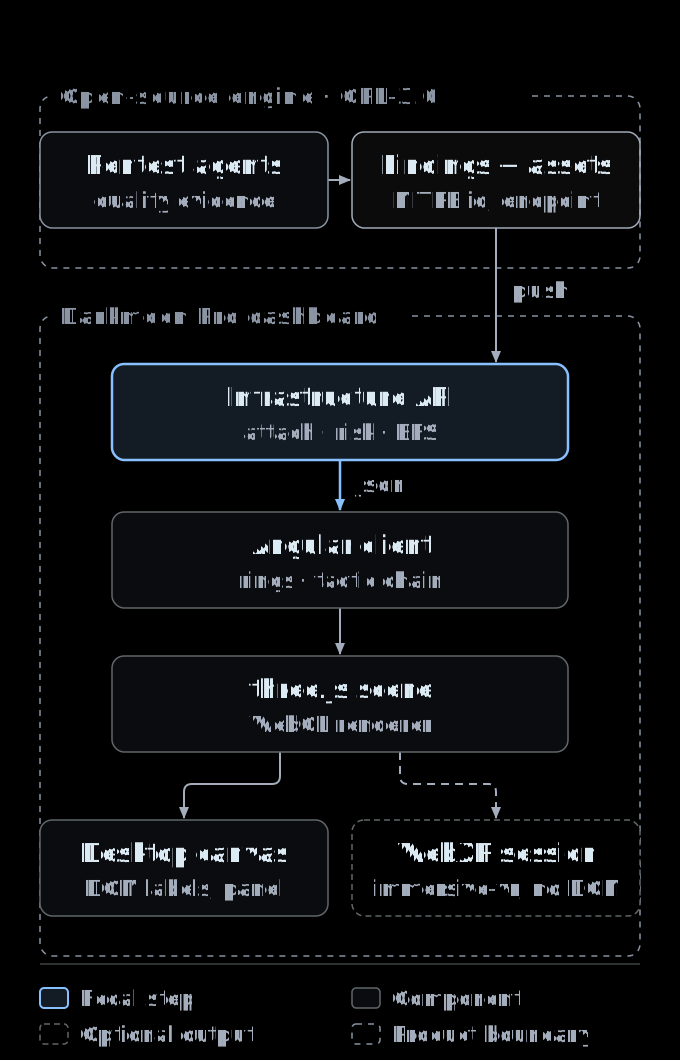
Figure 2 traces the data. The agents push each finding with its asset, endpoint and ATT&CK technique (the push tool exists in the open-source engine). The dashboard’s infrastructure API then does three deterministic things: it rebuilds the attachment of every finding to exactly one existing asset, using a fixed order of clues (the endpoint concerned, a leak from a data store, the asset named by the agent, the host and port, the application, and finally the target) and never invents an asset; it sets each asset’s risk to the maximum severity of its findings; and it computes attack paths by breadth-first search from the internet-facing entry to every asset carrying a high or critical finding. The Angular web client places assets on three rings (data and secrets, applications, internet-facing), maps techniques to tactics, and hands everything to a single three.js scene that renders either to the page or to a WebXR session.
Mapping assets, findings and paths
Figure 3 unrolls the rings into bands. The layout is radial by type: data stores, keys, TLS and authentication sit on the inner ring, applications and endpoints in the middle, hosts, the target and the remaining infrastructure on the outer ring. Edges come from the parent recorded for each discovered asset, which makes them containment relations (contains, runs, endpoint), not exploit preconditions. The traced path combines two things: a tactic chain (for each tactic present, the highest-CVSS finding, ordered from Reconnaissance to Impact, then joined by shortest paths over the edges) and the union of shortest paths from the entry to every high or critical asset. The guided tour narrates at most six steps.
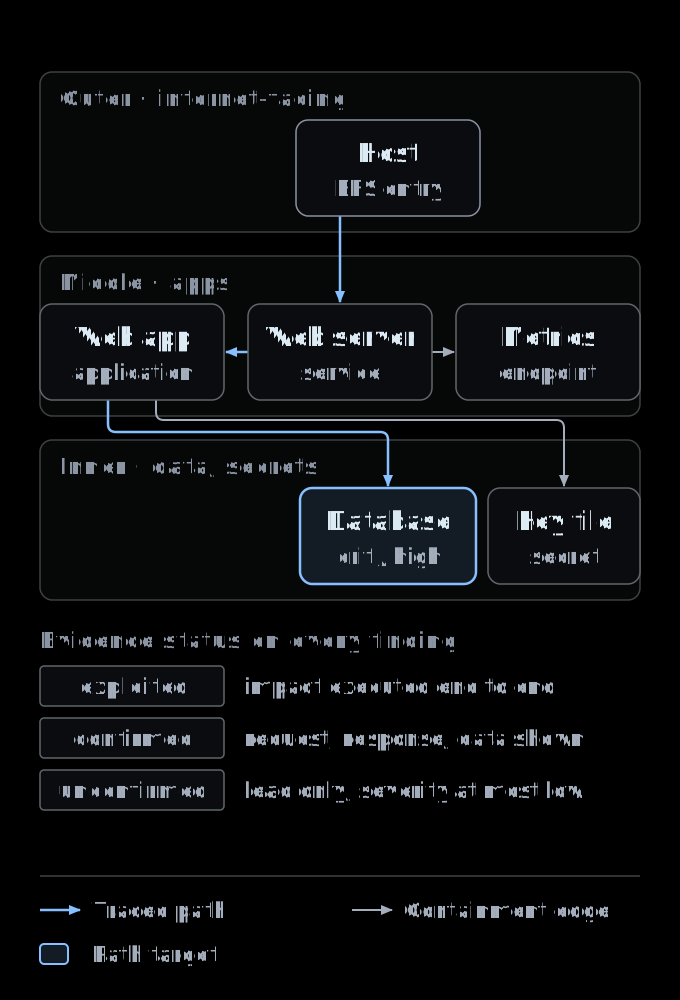
On the reference campaign we used during development, an OWASP Juice Shop lab, the graph held 17 assets, 14 edges and 57 findings (8 critical, 24 high, 21 medium, 4 low), all with an ATT&CK technique, 33 confirmed and 24 exploited. That is one small graph, far below the survey median of 120 nodes [25], and it is the only scale at which we have looked at the view.
Interaction, accessibility and the non-immersive default
The default view is the same WebGL scene seen head-on, a flat disc with orbit controls, so in practice a 2.5D map. Clicking an asset (or pointing a controller ray at it in VR) selects it and opens a side panel with its findings, their severity, CVSS, ATT&CK technique and evidence status. A toggle switches between the guided path and free exploration. For accessibility the component honors prefers-reduced-motion (no camera tweens, no moving particle), announces selections in an aria-live region, exposes a screen-reader list of every asset with its risk and finding count, and supports keyboard navigation (arrow keys walk assets by risk, Escape clears). The campaign, vulnerability and report pages of the dashboard remain the non-spatial alternatives. These choices follow the direction of the W3C XR Accessibility User Requirements, which ask for alternatives to motion and for object descriptions understood by assistive technology [10].
Desktop 3D versus immersive WebXR, as built
The VR control states why VR is unavailable (no secure context, no WebXR, no headset) and only offers “Enter VR” when isSessionSupported('immersive-vr') resolves true; the session requests local-floor and bounded-floor as optional features. Inside the headset the user sees the rings, the severity rings, warning markers and the red attack path, and can select assets with either controller. All text in the product view, asset labels, count badges, the guided narration and the finding panel, is HTML, and the code hides the label layer while presenting. So, as built, the immersive view is a spatial overview without text.
What we have not done
Engineering observations from the audit
- Two implementations of one rule. The client recomputes attachment and paths instead of consuming the paths computed by the API; the two can drift.
- Heuristics tuned on one lab. Endpoint patterns and some asset identifiers in the client mapping come from the reference lab; other targets fall back to the asset named by the agent and to generic rules.
- A reduced tactic table. Nineteen technique identifiers map to eight tactics, one tactic each. All 57 findings of the reference campaign mapped; techniques outside the table still appear on the graph but not in the narration. This is the single-tactic simplification ATT&CK warns against [12].
- Evidence status is not drawn. Risk rings and paths follow severity. The status appears only in the panel. Because the playbook instructs the agents to cap unconfirmed findings at low severity, high and critical targets are in practice confirmed or exploited (all of them were on the reference campaign), but the graph does not enforce or show it.
- Scaling. One WebGL renderer, pixel ratio capped at 2, small meshes per asset and DOM labels repositioned every frame: adequate for tens of assets, unmeasured beyond. A small detail found on the way: three.js ignores
linewidthunder WebGL and WebGPU [42], so the thicker severity ring the code requests renders at one pixel.
Hypotheses and a protocol to test them (future work)
Nothing in this section has been run. It is the experiment we think the evidence calls for, written down so that it can be criticized before it is done.
| Hypothesis | Why plausible | What would refute it |
|---|---|---|
| H1. An exposure-ring layout lets analysts find the entry and the data asset faster than a findings table | Position encodes exposure [19]; node-link favours path finding [18] | No time or accuracy gain over the table |
| H2. Desktop 3D is at least as accurate as the headset and faster for selection | Desktop fastest and most precise [24] | Headset faster with equal accuracy |
| H3. The headset helps on structure only for larger graphs | Effect grows with size [21, 22] | No interaction between display and graph size |
| H4. Showing evidence status on nodes improves prioritization and calibrates trust | Saliency of automation state [41] | Same ranking errors with and without status |
| H5. A guided path improves a non-expert’s briefing without hurting expert analysis | SA comprehension and projection [32, 38] | Experts slower or less accurate when guided |
Design. Within-subjects, counterbalanced, three conditions: findings table and report (2D baseline), desktop orbital view, WebXR headset. Three participant groups analysed separately: pentesters, SOC analysts and non-technical decision makers. Graphs taken from real campaign data at increasing sizes, never synthetic findings presented as real. Tasks. Identify the entry point; trace a path to a named data asset; rank the three findings to fix first; explain the risk to a non-expert in two minutes. Measures. Accuracy against a key prepared by two independent testers, completion time, NASA-TLX workload and SUS as used in the cyber studies above [36], the Simulator Sickness Questionnaire [28], freeze-probe questions on Endsley’s three levels [32], and, for the headset, frame time and session length. Validity. Preregister hypotheses and analysis, as expert-user immersive studies have done [27]; fix the sample size from a power analysis before recruiting; report negative results. A study run by the vendor of the tool is not independent, so we would publish materials and anonymized data for replication.
The n/a cells of Figure 1 are the gaps this protocol targets: no study we found compares 2D, desktop 3D and a headset on the same attack-path tasks with security professionals.
Limits and risks
- Novelty bias. Presence and flow rise in VR [31], [36]; neither is accuracy. An impressive demo is not evidence.
- Isolation from tools. Experts noted that VR cuts them off from their usual tools [36]; a headset view can only complement, never replace, the analyst’s workstation.
- Comfort and inclusion. Sickness, physical demand and text legibility limit session length and exclude some users [28], [30], [10]. The 2D path must stay complete.
- Over-trust in automation. A clean red path can look more certain than the evidence is [41]. Unconfirmed leads must be visually distinct.
- New attack surface. Immersive tools can introduce vulnerabilities of their own [38], and WebXR exposes tracking data under consent rules [1]. For a security dashboard, the headset is part of the threat model.
- Our own limits. One small reference graph, no headset measurement, no user study. Everything about benefit is a hypothesis.
Where we think it could go, labelled as envisaged: text panels as WebXR quad layers [3] so the finding panel is readable in a headset; evidence status encoded on nodes and edges; the client consuming the API’s paths; shared sessions for a pentester and a decision maker, the use case the collaborative studies point to [23], [34]; and a provenance view of the agents’ actions over time in the spirit of AgentLens [40]. None of this is built.
Further resources
- ASCIT31/Darkmoon-Benchmarks: the public benchmarks of LLM-driven autonomous pentesting run by the Darkmoon team on deliberately vulnerable labs. Its scope is offensive results (what was found and proved, at what cost); it contains no evaluation of visualization, WebXR or WebGL, and nothing in it supports or refutes the claims of this article.
- ASCIT31/Dark-Moon: the open-source engine (GPL-3.0), CLI and agents, including the status qualification rules discussed above.
- The product story of the orbital graph, the infrastructure graph page, and the multi-agent architecture that feeds it.
How this study was done
Sources were selected for primary status (standards, peer-reviewed papers, official documentation) and accessibility: every reference below was opened on 25 October 2026, either the publisher or repository page, the arXiv record, or bibliographic metadata with abstract (Crossref, OpenAlex, HAL). Where only an abstract was available we cite only what the abstract states. Browser support figures come from caniuse on that date and will change. The code audit read the dashboard component and its API (private repository, September 2026 version) and the open-source agent playbook at the commit given; the reference campaign figures were counted from the fixture files used to develop the view. We did not run user studies or headset measurements.
References
- W3C Immersive Web WG. WebXR Device API. Candidate Recommendation Draft, 9 June 2026. www.w3.org/TR/webxr/
- MDN Web Docs. WebXR Device API. developer.mozilla.org/en-US/docs/Web/API/WebXR_Device_API
- W3C. WebXR Layers API Level 1. Working Draft, 11 August 2026. www.w3.org/TR/webxrlayers-1/
- W3C. WebXR DOM Overlays Module. Working Draft, 24 September 2024. www.w3.org/TR/webxr-dom-overlays-1/
- W3C GPU for the Web WG. WebGPU. Candidate Recommendation Draft, 15 September 2026. www.w3.org/TR/webgpu/
- Khronos Group. WebGL 2.0 Specification (editor’s draft). registry.khronos.org/webgl/specs/latest/2.0/
- caniuse.com. WebXR Device API (consulted 25 October 2026). caniuse.com/webxr
- caniuse.com. WebGPU (consulted 25 October 2026). caniuse.com/webgpu
- A. R. Cannon, B. Zachernuk. Introducing Natural Input for WebXR in Apple Vision Pro. WebKit blog, 19 March 2024. webkit.org/blog/15162/introducing-natural-input-for-webxr-in-apple-vision-pro/
- W3C APA WG. XR Accessibility User Requirements. Working Group Note, 25 August 2021. www.w3.org/TR/xaur/
- MITRE ATT&CK. Enterprise tactics (ATT&CK v20). attack.mitre.org/tactics/enterprise/
- MITRE ATT&CK. T1078 Valid Accounts. attack.mitre.org/techniques/T1078/
- O. Sheyner, J. Haines, S. Jha, R. Lippmann, J. M. Wing. Automated Generation and Analysis of Attack Graphs. IEEE Symposium on Security and Privacy, 2002. www.cs.cmu.edu/afs/cs.cmu.edu/project/calder/www/sp02.html
- X. Ou, S. Govindavajhala, A. W. Appel. MulVAL: A Logic-based Network Security Analyzer. 14th USENIX Security Symposium, 2005, pp. 113–128. www.usenix.org/legacy/events/sec05/tech/ou.html
- S. Noel, S. Jajodia. Understanding Complex Network Attack Graphs through Clustered Adjacency Matrices. ACSAC 2005, pp. 160–169. acsac.org/2005/abstracts/87.html
- H. S. Lallie, K. Debattista, J. Bal. A review of attack graph and attack tree visual syntax in cyber security. Computer Science Review 35, 100219, 2020. wrap.warwick.ac.uk/id/eprint/131160
- A.-M. Konsta, B. Spiga, A. Lluch Lafuente, N. Dragoni. A Survey of Automatic Generation of Attack Trees and Attack Graphs. arXiv:2302.14479, 2023. arxiv.org/abs/2302.14479
- M. Ghoniem, J.-D. Fekete, P. Castagliola. A Comparison of the Readability of Graphs Using Node-Link and Matrix-Based Representations. IEEE InfoVis 2004. hal.science/hal-00343819
- W. S. Cleveland, R. McGill. Graphical Perception: Theory, Experimentation, and Application to the Development of Graphical Methods. Journal of the American Statistical Association 79(387), 1984. doi.org/10.1080/01621459.1984.10478080
- C. Ware, G. Franck. Evaluating Stereo and Motion Cues for Visualizing Information Nets in Three Dimensions. ACM Transactions on Graphics 15(2), 1996, pp. 121–140. scholars.unh.edu/ccom/939
- O.-H. Kwon, C. Muelder, K. Lee, K.-L. Ma. A Study of Layout, Rendering, and Interaction Methods for Immersive Graph Visualization. IEEE TVCG 22(7), 2016. doi.org/10.1109/TVCG.2016.2520921
- J. Kotlarek, O.-H. Kwon, K.-L. Ma, P. Eades, A. Kerren, K. Klein, F. Schreiber. A Study of Mental Maps in Immersive Network Visualization. IEEE PacificVis 2020 (arXiv:2001.06462). arxiv.org/abs/2001.06462
- M. Cordeil, T. Dwyer, K. Klein, B. Laha, K. Marriott, B. H. Thomas. Immersive Collaborative Analysis of Network Connectivity: CAVE-style or Head-Mounted Display? IEEE TVCG, 2017. doi.org/10.1109/TVCG.2016.2599107
- B. Bach, R. Sicat, J. Beyer, M. Cordeil, H. Pfister. The Hologram in My Hand: How Effective is Interactive Exploration of 3D Visualizations in Immersive Tangible Augmented Reality? IEEE TVCG, 2018. doi.org/10.1109/TVCG.2017.2745941
- L. Joos, M. T. Fischer, J. Rauscher, D. A. Keim, T. Dwyer, F. Schreiber, K. Klein. Visual Network Analysis in Immersive Environments: A Survey. arXiv:2501.08500, 2025. arxiv.org/abs/2501.08500
- B. Ens et al. Grand Challenges in Immersive Analytics. CHI 2021. doi.org/10.1145/3411764.3446866
- A. Batch et al. There Is No Spoon: Evaluating Performance, Space Use, and Presence with Expert Domain Users in Immersive Analytics. IEEE TVCG, 2020. doi.org/10.1109/TVCG.2019.2934803
- D. Saredakis et al. Factors Associated With Virtual Reality Sickness in Head-Mounted Displays: A Systematic Review and Meta-Analysis. Frontiers in Human Neuroscience, 2020. pmc.ncbi.nlm.nih.gov/articles/PMC7145389/
- E. Chang, H. T. Kim, B. Yoo. Virtual Reality Sickness: A Review of Causes and Measurements. International Journal of Human-Computer Interaction 36(17), 2020. doi.org/10.1080/10447318.2020.1778351
- J. Novotny, D. H. Laidlaw. Evaluating Text Reading Speed in VR Scenes and 3D Particle Visualizations. IEEE TVCG, 2024. doi.org/10.1109/TVCG.2024.3372093
- G. Makransky, T. S. Terkildsen, R. E. Mayer. Adding immersive virtual reality to a science lab simulation causes more presence but less learning. Learning and Instruction 60, 2019. doi.org/10.1016/j.learninstruc.2017.12.007
- M. R. Endsley. Toward a Theory of Situation Awareness in Dynamic Systems. Human Factors 37(1), 1995. doi.org/10.1518/001872095779049543
- U. Franke, J. Brynielsson. Cyber situational awareness – A systematic review of the literature. Computers & Security 46, 2014. doi.org/10.1016/j.cose.2014.06.008
- A. Kabil, T. Duval, N. Cuppens et al. 3D CyberCOP: a Collaborative Platform for Cybersecurity Data Analysis and Training. CDVE 2018. hal.science/hal-01831965
- A. Kabil, T. Duval, N. Cuppens. Alert Characterization by Non-Expert Users in a Cybersecurity Virtual Environment: a Usability Study. AVR 2020. hal.science/hal-02891940
- N. Delcombel, T. Duval, M.-O. Pahl. Cybercopters Swarm: Immersive analytics for alerts classification based on periodic data. Frontiers in Virtual Reality 4, 2023. doi.org/10.3389/frvir.2023.1156656
- K. Kullman, D. Engel. Interactive Stereoscopically Perceivable Multidimensional Data Visualizations for Cybersecurity. Journal of Defence & Security Technologies 4(3), 2022. doi.org/10.46713/jdst.004.03
- H. Ahmad, F. Ullah, R. Jafri. A Survey on Immersive Cyber Situational Awareness Systems. arXiv:2408.07456, 2024. arxiv.org/abs/2408.07456
- G. Deng et al. PentestGPT: An LLM-empowered Automatic Penetration Testing Tool. arXiv:2308.06782, 2023 (revised 2024). arxiv.org/abs/2308.06782
- J. Lu et al. AgentLens: Visual Analysis for Agent Behaviors in LLM-based Autonomous Systems. arXiv:2402.08995, 2024. arxiv.org/abs/2402.08995
- R. Parasuraman, V. Riley. Humans and Automation: Use, Misuse, Disuse, Abuse. Human Factors 39(2), 1997. doi.org/10.1518/001872097778543886
- three.js r186. LineBasicMaterial source documentation (linewidth). github.com/mrdoob/three.js/blob/r186/src/materials/LineBasicMaterial.js
See the proof, not just the write-up: the Pro remediation benchmark (fixes retested against the exploit) · how Darkmoon compares to other AI pentest tools.
← All articles